手机端底部定位
未知
2023-06-29 17:47:36
0次
问题描述:
需要实现的效果
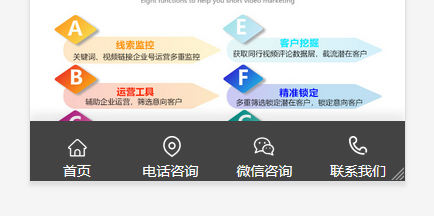
解决办法:
<!-- 底部 -->
<div class="layui-row">
<section id="toolbar">
<ul class="list clearfix">
<li><a href="" class="hover"><s class="too-home icon"></s><span>首页</span></a></li>
<li><a href="tel:15552569553"><s class="too-tel icon"></s><span>电话咨询</span></a></li>
<li><a onClick="wxzx()"><s class="too-qiao icon"></s><span>微信咨询</span></a></li>
<li><a href=""><s class="too-map icon"></s><span>联系我们</span></a></li>
</ul>
</section>
</div>
<!-- 弹出框 -->
<div id="wxnr">
<div class="nrdf"> <i onClick="gbcf()">X</i><img src="assets/picture/ewm.jpg" alt="询盘"/>
<p>截屏,微信识别二维码</p>
<p>微信号:<span id="btn" data-clipboard-text="">扫码添加</span></p>
<!--<p>(点击微信号复制,添加好友)</p>-->
<!--<p><a href="weixin://"><span class="wx"> 打开微信</span></a></p>-->
</div>
</div>
<script type="text/javascript">
/* 微信弹窗 */
function wxzx(){
$('#wxnr').fadeIn("fast");
$('#fdwx').fadeOut("fast");
}
function gbcf(){$('#fdwx').fadeIn("slow");$('#wxnr').fadeOut("fast");}
</script>
<style>
#toolbar {
position: fixed;
bottom: 0;
width: 100%;
z-index: 888;
height: 60px;
left: 0;
}
#toolbar .list {
width: 100%;
margin: 0 auto;
background: #434343;
box-shadow: 0 -8px 8px 0px rgb(0 0 0 / 8%);
}
ul, ol {
list-style-type: none;
}
#toolbar .list li {
float: left;
width: 25%;
text-align: center;
}
#toolbar .list a.hover {
/*background: #02a852;*/
}
#toolbar .list a {
display: block;
line-height:24px;
font-size: 14px;
color: #fff;
padding-top:15px;
}
#toolbar .list a .too-home {
background-position: 0.03px 0;
}
#toolbar .list a s {
margin-left: auto;
margin-right: auto;
width: 22px;
height: 22px;
display: block;
background-size: 5px auto;
}
.icon {
background: url(/static/assets/images/footicon.png) no-repeat;
}
#toolbar .list a span {
}
#toolbar .list a .too-home {
background-position:2px 3px;
background-size: 250px auto;
}
#toolbar .list a .too-tel {
background-position: -38px 0px;
background-size: 250px auto;
}
#toolbar .list a .too-qiao {
background-position: -80px 0px;
background-size: 250px auto;
}
#toolbar .list a .too-map {
background-position: -118px 0px;
background-size: 250px auto;
}
/*点击微信弹出框*/
#wxnr {
width: 100%;
height: 100%;
position: fixed;
top: 0;
z-index: 1000;
display: none;
background: rgba(0,0,0,.6);
}
#wxnr .nrdf {
margin: auto;
margin-top: auto;
position: absolute;
top: 30%;
left: 0;
right: 0;
width: 100%;
height: 330px;
padding-top: 0.3px;
padding-top: 66.6px;
margin-top: -2.5px;
text-align: center;
background-color: rgba(255, 255, 255, 0.8);
box-shadow: 0px 2px 6px #777;
-webkit-box-shadow: 0px 2px 6px #777;
-moz-box-shadow: 0px 2px 6px #777;
border-radius: 10px;
}
#wxnr i {
position: absolute;
top: 17.2px;
right: 19.2px;
width: 30.3px;
height: 30.3px;
font-size: 18.2px;
line-height: 33.3px;
text-align: center;
color: #fff;
font-weight: bold;
font-style: normal;
background: #333;
border-radius: 1px;
cursor: pointer;
}
#wxnr img {
width: 180.3px;
height: 180.3px;
display: block;
margin: 0 auto;
}
#wxnr p {
font-size: 20.24px;
text-align: center;
margin-top: 10px;
}
</style>

需要实现的效果
解决办法:
<!-- 底部 -->
<div class="layui-row">
<section id="toolbar">
<ul class="list clearfix">
<li><a href="" class="hover"><s class="too-home icon"></s><span>首页</span></a></li>
<li><a href="tel:15552569553"><s class="too-tel icon"></s><span>电话咨询</span></a></li>
<li><a onClick="wxzx()"><s class="too-qiao icon"></s><span>微信咨询</span></a></li>
<li><a href=""><s class="too-map icon"></s><span>联系我们</span></a></li>
</ul>
</section>
</div>
<!-- 弹出框 -->
<div id="wxnr">
<div class="nrdf"> <i onClick="gbcf()">X</i><img src="assets/picture/ewm.jpg" alt="询盘"/>
<p>截屏,微信识别二维码</p>
<p>微信号:<span id="btn" data-clipboard-text="">扫码添加</span></p>
<!--<p>(点击微信号复制,添加好友)</p>-->
<!--<p><a href="weixin://"><span class="wx"> 打开微信</span></a></p>-->
</div>
</div>
<script type="text/javascript">
/* 微信弹窗 */
function wxzx(){
$('#wxnr').fadeIn("fast");
$('#fdwx').fadeOut("fast");
}
function gbcf(){$('#fdwx').fadeIn("slow");$('#wxnr').fadeOut("fast");}
</script>
<style>
#toolbar {
position: fixed;
bottom: 0;
width: 100%;
z-index: 888;
height: 60px;
left: 0;
}
#toolbar .list {
width: 100%;
margin: 0 auto;
background: #434343;
box-shadow: 0 -8px 8px 0px rgb(0 0 0 / 8%);
}
ul, ol {
list-style-type: none;
}
#toolbar .list li {
float: left;
width: 25%;
text-align: center;
}
#toolbar .list a.hover {
/*background: #02a852;*/
}
#toolbar .list a {
display: block;
line-height:24px;
font-size: 14px;
color: #fff;
padding-top:15px;
}
#toolbar .list a .too-home {
background-position: 0.03px 0;
}
#toolbar .list a s {
margin-left: auto;
margin-right: auto;
width: 22px;
height: 22px;
display: block;
background-size: 5px auto;
}
.icon {
background: url(/static/assets/images/footicon.png) no-repeat;
}
#toolbar .list a span {
}
#toolbar .list a .too-home {
background-position:2px 3px;
background-size: 250px auto;
}
#toolbar .list a .too-tel {
background-position: -38px 0px;
background-size: 250px auto;
}
#toolbar .list a .too-qiao {
background-position: -80px 0px;
background-size: 250px auto;
}
#toolbar .list a .too-map {
background-position: -118px 0px;
background-size: 250px auto;
}
/*点击微信弹出框*/
#wxnr {
width: 100%;
height: 100%;
position: fixed;
top: 0;
z-index: 1000;
display: none;
background: rgba(0,0,0,.6);
}
#wxnr .nrdf {
margin: auto;
margin-top: auto;
position: absolute;
top: 30%;
left: 0;
right: 0;
width: 100%;
height: 330px;
padding-top: 0.3px;
padding-top: 66.6px;
margin-top: -2.5px;
text-align: center;
background-color: rgba(255, 255, 255, 0.8);
box-shadow: 0px 2px 6px #777;
-webkit-box-shadow: 0px 2px 6px #777;
-moz-box-shadow: 0px 2px 6px #777;
border-radius: 10px;
}
#wxnr i {
position: absolute;
top: 17.2px;
right: 19.2px;
width: 30.3px;
height: 30.3px;
font-size: 18.2px;
line-height: 33.3px;
text-align: center;
color: #fff;
font-weight: bold;
font-style: normal;
background: #333;
border-radius: 1px;
cursor: pointer;
}
#wxnr img {
width: 180.3px;
height: 180.3px;
display: block;
margin: 0 auto;
}
#wxnr p {
font-size: 20.24px;
text-align: center;
margin-top: 10px;
}
</style>
上一篇:手机端右侧导航
相关内容
热门资讯
downloadable fo...
downloadable font: Glyph bbox was incorrect怎么处理
腾讯邮箱qq邮箱使用SMTP开...
第一步:登录 https://mail.qq.com/ 登录后点击设置---账号 第二步:点击【开启...
layui tooltip提示...
在layui表单中,我们想把一个标签做出提示,以标明这个表单元素是做什么有什么功能时,就可以用上提...
layui中出错Unexpec...
layui中出错Unexpected identifier
解决Phpcms V9手机门户...
第一步:开启手机网站。位置:模块 》手机门户 》 添加手机站点,如果模块里面没有手机门户,那么就在模...
JavaScript获取当前协...
JavaScript获取当前协议,域名,路径
JS实现html打印功能,打印...
!DOCTYPE htmlhtmlhead meta charset=utf-8 title打印功能...
bootstrap 图片文字居...
问题描述: 让图片和文字居中显示。 解决办法: !-- style--.navbars img{ m...
bootstrap图片排版布局
问题描述: 在使用bootstrap的时候,出现了这样的问题。 排版对不齐。 解决办法: 通过上图发...